How to fill and sign a PDF in your browser
You do not need to convert a PDF into Word just to fill in a few details. PDFDesk lets you add visible text, dates, drawn signatures and signature images directly over the existing pages.
Open Fill & SignOpen and fill the document
- Open Fill & Sign, choose your PDF and select Open PDF editor.
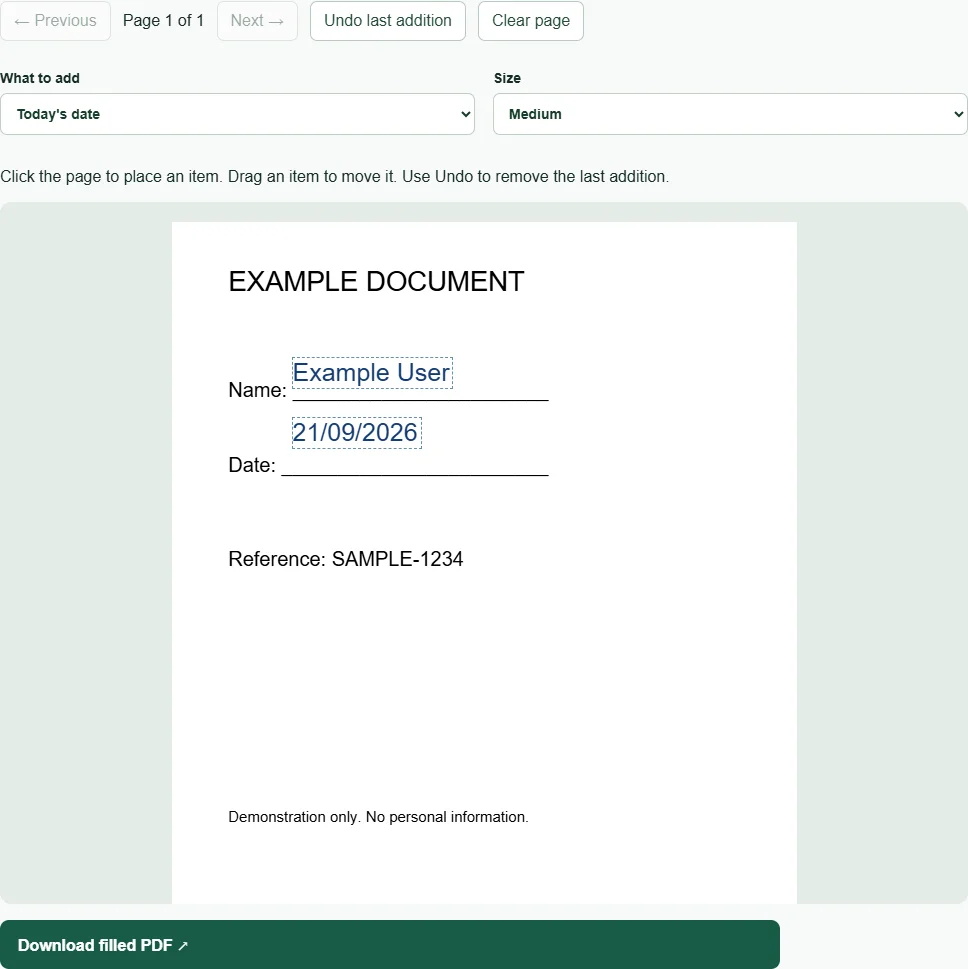
- Choose Text under What to add. Enter your text and select a size.
- Click the PDF where the text should begin. Drag the added item to adjust its position.
- Choose Today’s date and click its position if a date is required. The value comes from your device’s date.
- Use Previous and Next to work on other pages.
This adds visible marks to the page. It does not edit the wording already in the PDF or turn printed boxes into interactive form fields.
Add a signature
Select Drawn signature and draw in the signature pad with a mouse, stylus or touch input. Then click on the PDF to place it. Clear signature resets the pad for another attempt.
Alternatively, choose Signature image and select a JPG or PNG up to 5 MB. A tightly cropped PNG with a transparent background generally fits more neatly than a photo with a large white border.
Use Undo last addition to remove the most recent item on the current page. Clear page removes additions on that page only.
Download and review
Select Download filled PDF, then use the download link. Open the saved file and check that text fits within the intended spaces and that every required page has been completed.
The original PDF page content is retained. Your added marks are flattened visual annotations, so they are not editable text fields in the saved copy. Keep the original in case you need to start again.
A visible signature is not a digital certificate
This tool adds a visible representation of a signature. It does not create a certificate-based digital signature, verify anyone’s identity, send signature requests or record a signing audit trail.
Check what the recipient requires before using the output. If they ask for a specific signing platform or certificate, a drawn mark is not a substitute. The tool accepts unencrypted PDFs up to 50 MB and keeps file processing on your device.