How to compress a PDF below 500 KB
An upload form asks for a PDF smaller than 500 KB, but your document is several megabytes. Start with the least destructive option, then reduce image quality only if the document still needs to shrink.
Open Compress PDFChoose a mode that fits your document
PDFDesk has two approaches. Keep selectable text optimizes the PDF structure without intentionally turning pages into pictures. It is a sensible first choice for reports, letters and other text documents, but it may produce only a small saving.
The two Scanned document settings render every page as a compressed image. Balanced keeps more detail; Smaller file uses lower resolution and quality. These modes remove selectable text, links, forms and existing signatures. Keep an original copy.
Compress your file
- Open Compress PDF and choose your document.
- Select Keep selectable text as the compression mode.
- Under Optional target, choose Below 500 KB, then select Compress PDF.
- Read the before-and-after sizes and the target result.
- If needed, try Scanned document · balanced, then Smaller file if image-based pages are acceptable.
- Download the result and inspect small text, stamps and diagrams before submitting it.
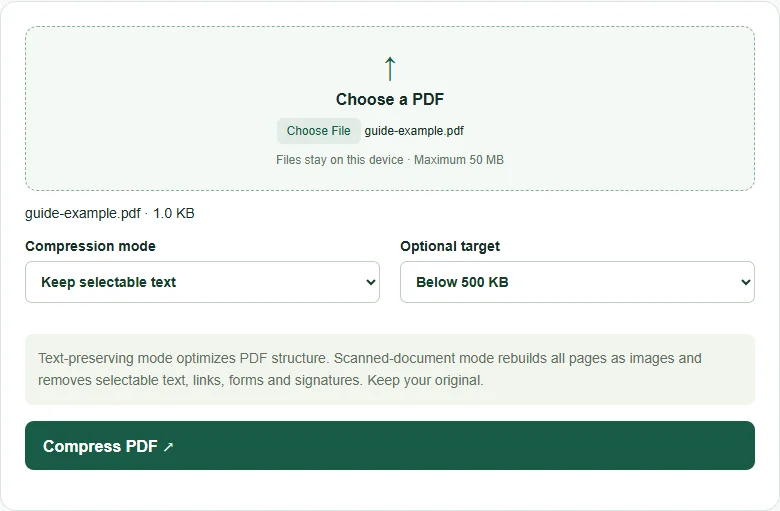
What the target setting actually does
The target is a check, not a promise or an automatic quality search. Selecting 500 KB does not guarantee that every PDF can be reduced below that size. PDFDesk reports whether the chosen settings reached the target. It keeps the original download if the processed result would be larger.
For example, a 1.2 MB file reduced to 620 KB is smaller but still above a 500 KB limit. You would need another setting or a shorter document. The tool uses 1 KB = 1,024 bytes; an upload portal may calculate its limit differently, so leave some headroom.
If the file is still too large
Remove unnecessary pages, or split the document if the receiving service permits separate files. A long document cannot always fit a tiny limit while remaining legible. Do not discard required pages or accept unreadable text just to satisfy the size check.
Compression accepts up to 50 MB. The scanned-document modes support up to 100 pages per run. For a larger PDF, extract the relevant pages first.